fmr.blog | Interactive Blog & Project Portfolio Hub
High-performance personal blog and interactive portfolio showcase powered by Astro 5, TypeScript, React 19, MUI Icons, and Vanilla CSS.
📌 1. Problem
As a web developer and IT network engineer, establishing an independent publishing platform to document technical laboratory research, AI automation experiments, and project portfolios is essential.
However, building modern tech blog & portfolio platforms faces 4 primary challenges:
- Overhead & Speed Bottlenecks: Traditional blogging platforms (like WordPress or Medium) impose customization limits, heavy script bloat, and recurring hosting costs.
- SEO Optimization & GSC Validation: Automated sitemap generators on i18n static sites frequently trigger Soft 404 errors or link duplication issues in Google Search Console.
- Design Flexibility & Branding Constraints: Generic utility UI frameworks yield monotonous layouts that fail to reflect modern design standards.
- JavaScript Hydration Performance Risks: Pure Single Page Application (SPA) frameworks ship substantial JS payloads to mobile devices.
👤 2. Target User
- Recruiters & Industry Partners: Require instant verification of technical credibility, project track records, and qualifications of Fatahilah Miftahul Rahman.
- Developers & Network Engineers: Seeking structured bilingual technical articles, network topology documentations, and AI prompt automation guides.
- General Readers: Demand a responsive, fast, ad-free, and accessible reading experience across mobile networks.
💡 3. Solution
Built fmr.blog, a next-gen technical blog and portfolio platform powered by Astro 5 featuring Zero-JS-by-default Islands Architecture deployed on Cloudflare Pages Edge Network.
Core technical solutions:
- Islands Architecture & React 19 Integration: Ships client-side JavaScript strictly for interactive elements (such as MUI Icons and Theme Toggle) while rendering 100% pure static HTML for page content.
- Rich Structured Data (JSON-LD SEO): Dynamically injects Schema.org metadata (
BlogPosting,SoftwareApplication,Person,WebSite) for maximum search engine indexation. - Custom Vanilla CSS Design System: Modular CSS token architecture (OLED Midnight & Editorial Light) featuring cubic-bezier micro-animations and glassmorphism without utility framework overhead.
- Smart Interactive Features: Instant live search filtering, categorical tag selection, 1-click syntax copy buttons, and Giscus comments powered by GitHub Discussions.
⭐ 4. Key Features
- ⚡ Extreme Performance & Zero-JS Core: Blazing-fast page loads achieving peak Core Web Vitals scores across mobile and desktop devices.
- 📂 Live Search & Interactive Tag Filtering: Real-time search filtering across articles and projects by keyword or tech category.
- 🌐 Precision SEO & GSC Sitemap Handling: Clean
@astrojs/sitemapintegration avoiding redundant hreflang tags for instant indexing. - 🎨 Anti-FOUC Theme Switcher: Seamless dark/light theme switching without color flashes upon initial page load.
- 📋 1-Click Code Copy Button: Automated copy buttons appended to syntax code blocks for effortless script sharing.
- 💬 Giscus Comment System: Secure, developer-friendly comment system powered by GitHub Discussions.
- 📖 Reading Time & Language Badges: Automated reading time estimation and clear bilingual content indicators (ID/EN).
🧱 5. Challenges & Lessons Learned
- Challenge 1: MUI Icon Rendering in Astro Scoped CSS
- Issue: React
@mui/icons-materialcomponents do not automatically inherit Astro’s scoped CSS attributes, causing search icon misalignment and dropdown arrow rotation failures. - Solution: Separated CSS-animated functional icons (reverted to inline SVGs) from decorative icons (wrapped in local HTML container elements).
- Issue: React
- Challenge 2: Domain Migration & GSC Sitemap Validation
- Issue: Migrating main domain from
blog.fatahmr.my.idtoblog.fatah.web.idcaused duplicate URL warnings and sitemap fetch failures in Google Search Console. - Solution: Reconfigured
astro.config.mjs, updated XML sitemap index structures, and implemented clean 301 redirect rules at Cloudflare edge.
- Issue: Migrating main domain from
- Challenge 3: JSON-LD Structured Data Schema Integration
- Issue: Article and project pages required structured SEO schemas to qualify for rich snippet search results on Google.
- Solution: Injected dynamic JSON-LD schemas in
Base.astro, article[slug].astro, and project[slug].astrolayouts.
📈 6. Impact
- Before: Articles and portfolio entries were fragmented across third-party platforms without brand control or SEO ownership.
- After:
- Peak Speed Performance: Pages load in milliseconds with 95+ scores on Google PageSpeed Insights.
- 100% Search Engine Indexation: Clean XML sitemaps and routes successfully fetched and indexed without GSC errors.
- Centralized Knowledge Hub: Established as the official documentation hub for all IT projects, lab research, and open-source repositories.
🛠️ Tech Choices
- Astro 5: Chosen as core framework for its pure SSG output and ultra-fast Islands Architecture.
- TypeScript: Enforces strict type-safety for content collections via Zod Schemas.
- React 19 & MUI Icons: Selected for interactive component islands and consistent Google Material Design icons.
- Vanilla CSS: Provides absolute control over CSS tokens, bundle efficiency, and glassmorphism styling without utility overhead.
- Cloudflare Pages: Global edge static hosting platform providing top-tier distribution speed, free SSL, and high reliability.
🖼️ Screenshots & Visual Demo
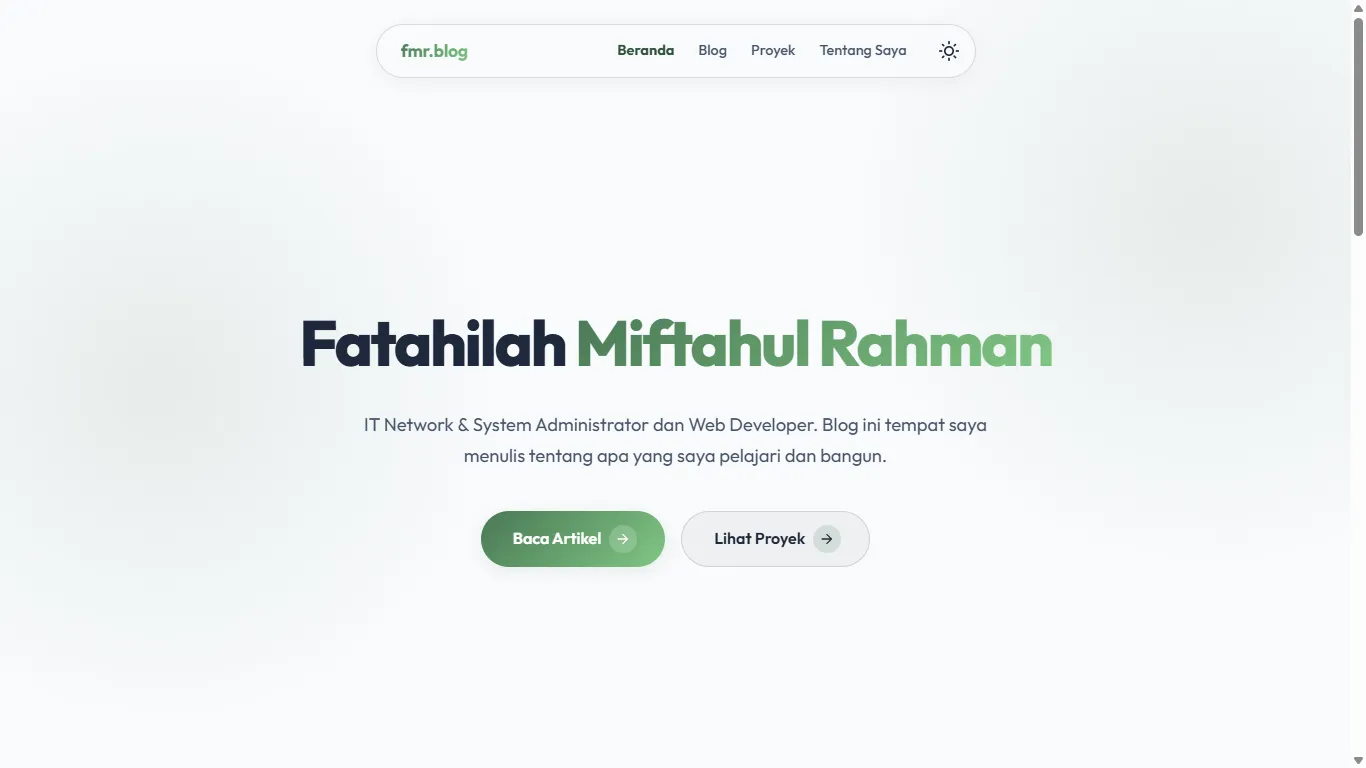 Figure 1: Main landing page of fmr.blog showcasing a responsive hero section, author profile, and primary action buttons.
 Figure 2: Interactive blog directory page featuring real-time live search, category filtering, language indicator badges (IND/ENG), and reading time estimation.
 Figure 3: Project showcase gallery displaying structured portfolio cards complete with keyword search and tech stack tag filters.
 Figure 4: ‘About Me’ profile page documenting professional qualifications as a Web Developer, IT Network System Administrator, and technical background.
 Figure 5: Sveltia CMS dashboard (
/admin/) for zero-code blog article collection management.
 Figure 6: Sveltia CMS project collection management panel displaying all portfolio showcase entries and new item creation buttons.
 Figure 7: Sveltia CMS global media asset manager (
/public/uploads) for uploading, sorting, and organizing image files.
Daftar Sumber & Referensi Dikutip (4)
- Official Astro 5 Documentation https://docs.astro.build ↗
- Google Search Central - Sitemap Guidelines https://developers.google.com/search/docs/crawling-indexing/sitemaps/overview ↗
- MUI Material Icons Documentation https://mui.com/material-ui/material-icons/ ↗
- Cloudflare Pages Edge Hosting https://developers.cloudflare.com/pages/ ↗