MikroTik Gateway Setup & Network Security Guide
Daftar Isi
- 🛠️ Hardware & System Specifications
- 📊 IP Addressing Scheme (Address List)
- 🖼️ WinBox Interface & Configuration Proof
- 💻 Core Configuration Parameters (WinBox & CLI)
- 1. Firewall NAT (Network Address Translation)
- 2. DHCP Server Services & IP Pools
- 🧪 Testing & Verification Documentation
- 1. Router Internet Connectivity Verification
- 🔍 Field Troubleshooting & Resolution
- Problem 1: Wireless Clients Experiencing High Latency & Disconnections (RTO)
- Problem 2: Wired LAN Clients Failing to Receive Automatic DHCP Leases
- 💬 Discussion & Community Input
Building a stable and secure local network infrastructure requires structured gateway configurations on enterprise router hardware. In this practical guide, we cover the implementation steps for deploying a functional gateway on a MikroTik RouterBoard RB951Ui-2HnD, including IP address allocation, WLAN interface activation, Firewall NAT, DHCP Server, and real-world troubleshooting techniques.
🛠️ Hardware & System Specifications
All configuration commands and verification logs in this laboratory exercise were executed on the following hardware platform:
| System Parameter | Hardware & System Value |
|---|---|
| Device Model | MikroTik RB951Ui-2HnD (Architecture: mipsbe) |
| RouterOS Version | RouterOS v6.49.6 (Accessed via WinBox 64-bit) |
| Router Identity | Mk Fatah |
| MAC Address Session | 64:D1:54:D4:94:81 |
📊 IP Addressing Scheme (Address List)
The network topology is partitioned into three main segments: WAN Internet uplink, wired Local Area Network (LAN), and wireless LAN (WLAN).
| Interface | IP Address / Prefix | Network | Description & Host Capacity |
|---|---|---|---|
ether1-WAN | 192.168.0.105/24 | 192.168.0.0 | Dynamic (D) Uplink / ISP Gateway |
ether2-LAN | 192.168.10.1/26 | 192.168.10.0 | Wired Local Segment (Max 62 Hosts) |
wlan1-WLAN | 192.168.20.1/25 | 192.168.20.0 | Wireless Local Segment (Max 126 Hosts) |
🖼️ WinBox Interface & Configuration Proof
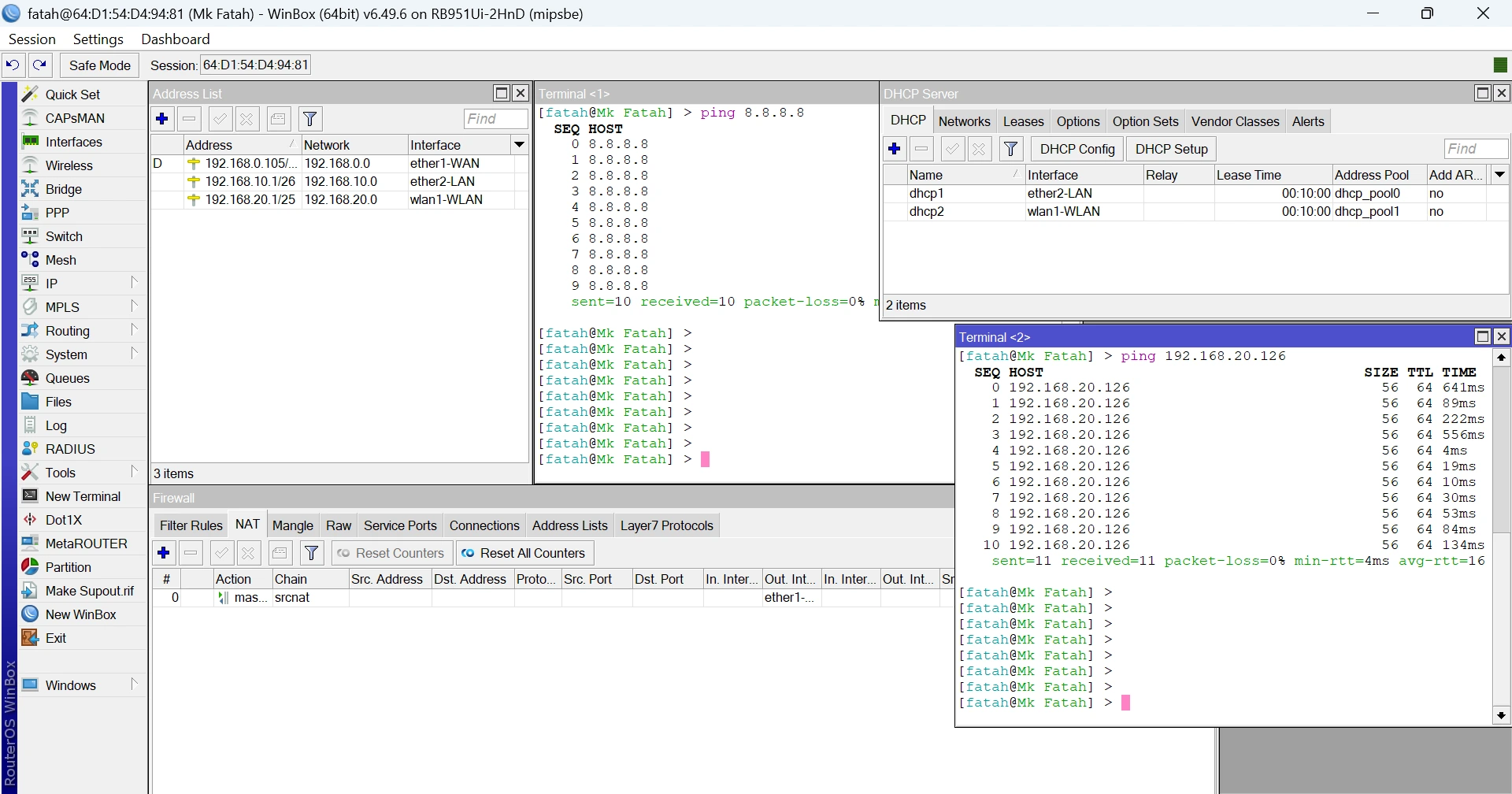 Figure 1: WinBox (64-bit) v6.49.6 interface displaying IP Address list, Firewall NAT masquerade rules, DHCP Server pools, and terminal ping test.
💻 Core Configuration Parameters (WinBox & CLI)
1. Firewall NAT (Network Address Translation)
To allow local IP segments (192.168.10.0/26 and 192.168.20.0/25) to route packets to the public internet, we enable Source NAT (Masquerade) on the WAN interface:
/ip firewall nat
add chain=srcnat out-interface=ether1-WAN action=masquerade comment="NAT Masquerade Internet Access"
2. DHCP Server Services & IP Pools
Provisioning automated IP address leases for wired and wireless client devices with a 10-minute lease duration:
/ip pool
add name=dhcp_pool0 ranges=192.168.10.2-192.168.10.62
add name=dhcp_pool1 ranges=192.168.20.2-192.168.20.126

/ip dhcp-server
add name=dhcp1 interface=ether2-LAN lease-time=10m address-pool=dhcp_pool0 disabled=no
add name=dhcp2 interface=wlan1-WLAN lease-time=10m address-pool=dhcp_pool1 disabled=no
🧪 Testing & Verification Documentation
1. Router Internet Connectivity Verification
Verifying outbound internet routing directly from the MikroTik terminal by transmitting ICMP packets to public DNS (8.8.8.8):
[fatah@Mk Fatah] > ping 8.8.8.8
  SEQ HOST                                     SIZE TTL TIME  STATUS
    0 8.8.8.8                                    56  116 12ms
    1 8.8.8.8                                    56  116 11ms
    sent=10 received=10 packet-loss=0% min-rtt=11ms avg-rtt=13ms max-rtt=18ms
🔍 Field Troubleshooting & Resolution
Problem 1: Wireless Clients Experiencing High Latency & Disconnections (RTO)
- Issue: Wireless client devices connected to
wlan1-WLANexperienced intermittent disconnections and high Round Trip Time (RTT). - Analysis: Sufferings from 2.4GHz frequency interference caused by congested default channels (
auto) in the surrounding radio environment. - Solution: Conducted a Wireless Frequency Scan, locked the channel to an uncongested frequency, tuned the band to
2GHz-only-N, and disabled unused proprietary wireless protocols (nstrex/nv2).
Problem 2: Wired LAN Clients Failing to Receive Automatic DHCP Leases
- Issue: Client workstations connected to
ether2-LANreceived APIPA self-assigned IP addresses (169.254.x.x). - Analysis: The
dhcp1server status entered an invalid state becauseether2-LANwas accidentally bound inside a Bridge Interface. - Solution: Unbound
ether2-LANfrom the bridge interface, then assigned the DHCP Server directly to physical portether2-LAN. Following this adjustment, client devices immediately acquired precise leases in192.168.10.x/26.
💬 Discussion & Community Input
Have you encountered 2.4GHz Wi-Fi latency spikes (RTO) or DHCP lease allocation issues on your MikroTik deployment? Share your experience or questions in the comments section below!
References & Cited Sources (2)
- Official MikroTik RouterOS Manual Documentation https://help.mikrotik.com/docs/display/ROS/RouterOS+documentation ↗
- MikroTik Firewall NAT & Masquerade Guide https://wiki.mikrotik.com/wiki/Manual:IP/Firewall/NAT ↗